
Zebra ZQ630 Plus: The 4-Inch Mobile Printer Built for Operations That Can’t Afford to Walk Back to the Print Station
Posted by Advanced Automation on Oct 12th 2026
By Advanced Automation, Inc. | Mobile Printers | Zebra ZQ630 Plus Spotlight
This is a straightforward product walkthrough. What the ZQ630 Plus does, where it fits, what the different configurations are, and the questions we get asked most often before a fleet purchase. No filler.
What Is the Zebra ZQ630 Plus?
What makes it different from a standard mobile printer?
The ZQ630 Plus is Zebra's top-tier 4-inch mobile thermal printer. Where most mobile printers top out at 2 or 3 inches of print width and struggle with anything wider than a basic shipping label, the ZQ630 Plus handles the full 4-inch format that covers standard 4x6 shipping labels, shelf labels, compliance labels, and linerless media. The 4-inch width is what separates it from the ZQ521 and similar smaller mobile printers. If your labels are wider than 3 inches, the ZQ630 Plus is the right mobile format.
It runs direct thermal, meaning no ribbon. Labels load from a 0.75-inch core, and the printer supports both linered and linerless media from 2.0 to 4.4 inches wide. That linerless support matters for operations that have moved to linerless labels to reduce liner waste and increase labels per roll. The ZQ630 Plus handles it natively without a separate linerless kit for most configurations.
What operations is it built for?
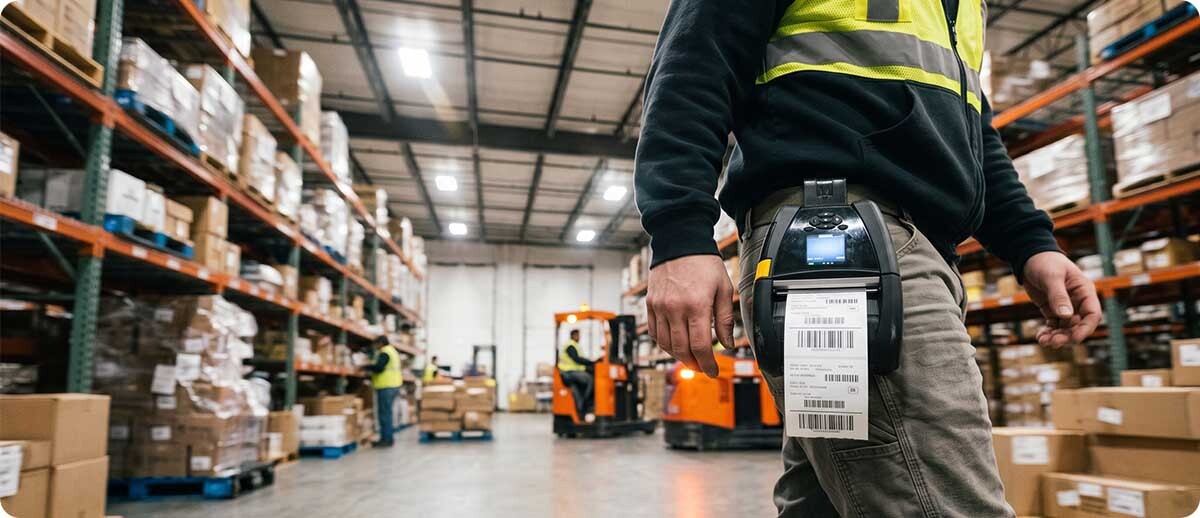
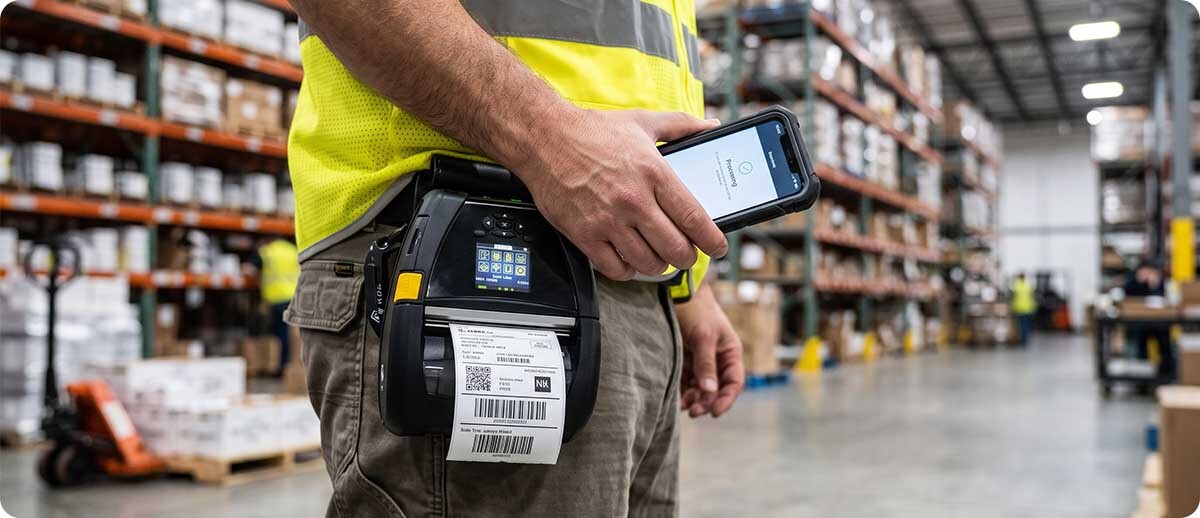
Primarily distribution centers, retail operations, and field service environments where printing happens across a large floor or in locations where a fixed printer creates unnecessary worker travel. The clearest use case is a DC worker who currently walks back to a fixed print station every time they need a label, losing 2 to 5 minutes per trip multiplied across the shift. With the ZQ630 Plus on a belt or cart mount, that worker prints at the point of work and the walk disappears. Other strong fits include retail shelf labeling (printing directly at the shelf), reverse logistics (printing return labels on the floor rather than at a desk), and asset management workflows where items are tagged in the field.
Key Specs
| Print method | Direct thermal (no ribbon) |
| Resolution | 203 dpi |
| Print width | 4 inches (max media width 4.4 inches) |
| Print speed | Up to 4.5 ips (115 mm/s) |
| Media support | Linered and linerless, 2.0" to 4.4" wide, 0.75" core |
| Battery | 6,600 mAh PowerPrecision+, rated for double shifts |
| Connectivity | Wi-Fi 6 (802.11ax) dual radio, Bluetooth 5.x, NFC Print Touch, Ethernet when docked |
| Drop rating | 6 feet to concrete |
| Sealing | IP54 dust and water resistance |
| Printer languages | ZPL, CPCL, EPL, ZBI 2.0 |
| MDM support | Zebra DNA, SOTI MobiControl, 42Gears SureMDM |
| Backward compatibility | QLn420 accessories including cradles and mounts |
ZQ630 Plus Configurations at Advanced Automation
Which ZQ630 Plus SKU should we order?
AA carries the ZQ630 Plus in three main configurations depending on your media type and whether you need RFID encoding:
ZQ630 Plus Standard
Wi-Fi 6 + Bluetooth 5.x | Linered and linerless media | Standard linered platen roller
ZQ63-AUXA004-00: The standard ZQ630 Plus configuration for operations printing linered labels. Wi-Fi 6 dual radio, BT 5.x, NFC, 6,600 mAh battery, IP54, 6ft drop.
Shop ZQ63-AUXA004-00 →ZQ630 Plus Fanfold
Wi-Fi 6 + Bluetooth 5.x | Fanfold media support | For operations using fanfold label stacks
ZQ63-AUFA004-00: The fanfold configuration for operations that stage label stacks in external bins rather than internal roll media. Same printer platform and connectivity as the standard.
Shop ZQ63-AUFA004-00 →ZQ630 Plus RFID
UHF RAIN RFID encoding | Wi-Fi 6 + Bluetooth 5.x | For RFID label printing and encoding in the field
ZQ63-RUXA004-00: Adds UHF RAIN RFID encoding to the ZQ630 Plus platform. Prints and encodes RFID labels, tags, and cards in a single pass. The only mobile 4-inch RFID printer in this class.
Shop ZQ63-RUXA004-00 →ZQ630 Plus Replacement Battery
6,600 mAh PowerPrecision+ | Hot-swappable | For fleet battery rotation
BTRY-MPP-68MA1-01: Spare battery for hot-swap during shift change. Fleet operations running multiple shifts should stock at least one spare per printer to avoid charging downtime between shifts.
Shop BTRY-MPP-68MA1-01 →What Makes the ZQ630 Plus Worth Looking At in 2026
Wi-Fi 6 in a mobile printer: does it actually matter?
Yes, specifically in high-density Wi-Fi environments. A large DC or warehouse with dozens of mobile devices all competing for bandwidth on older 802.11ac access points sees real-world connection issues during peak times, which means dropped print jobs, retries, and worker frustration. Wi-Fi 6 (802.11ax) handles device density significantly better than 802.11ac because of how it manages multiple simultaneous connections through OFDMA. In a 50-device mobile fleet on a modern Wi-Fi 6 network, the ZQ630 Plus maintains a stable connection where an older mobile printer may struggle. If your facility has already updated its wireless infrastructure to Wi-Fi 6, the ZQ630 Plus takes full advantage of it.
What does the 6,600 mAh battery actually mean in practice?
Zebra rates it for double shifts without recharging. In real-world use, a distribution center worker printing several hundred labels per shift will typically run through most of the battery in one shift under heavy use, making the double-shift rating conservative for lighter use. For most single-shift operations the printer will end the day with meaningful battery remaining. For two-shift operations, hot-swapping a spare battery at shift change is the cleanest approach rather than charging mid-shift. The PowerPrecision+ battery communicates health data to Zebra's management tools, so IT can track battery degradation across the fleet and proactively replace aging batteries before they cause mid-shift failures rather than waiting for workers to report them.
Is NFC Print Touch actually useful or just a spec?
It's genuinely useful for one specific thing: pairing a phone or mobile computer to the printer for the first time. Rather than walking through a Bluetooth pairing menu or entering credentials, a worker taps their NFC-enabled Android or iOS device to the printer's NFC tag and the pairing completes. For operations that rotate workers across printers or frequently reassign printers to different workers, this removes a small but real friction point every time a new pairing needs to happen. It also enables tap-to-print workflows in some Zebra software configurations.
We have QLn420 cradles and mounts already. Do we need to replace them?
No. The ZQ630 Plus is backward compatible with QLn420 accessories including cradles and vehicle mounts. If you are upgrading from a QLn420 fleet to the ZQ630 Plus, your existing cradle infrastructure carries over. This is a meaningful cost savings for operations with a large installed base of QLn420 vehicle mounts and charging cradles. Confirm specific accessory compatibility with us before a fleet migration since not every QLn420 accessory is compatible with every ZQ630 Plus configuration, but the core cradle and mount compatibility is confirmed.
ZQ630 Plus vs ZQ521: Which One?
What is the deciding factor between these two models?
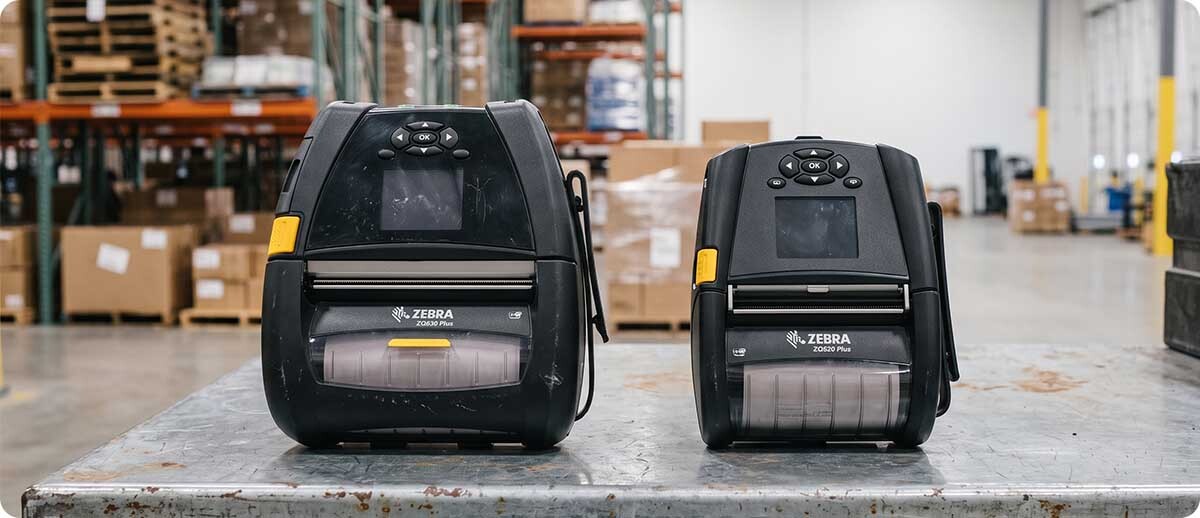
Print width is usually the deciding factor. The ZQ521 prints up to 2 inches wide, which covers most receipt and small barcode label applications. The ZQ630 Plus prints up to 4 inches wide, covering standard 4x6 shipping labels, compliance labels, shelf labels, and anything else in the wider format range. If your labels are 4x6 or your workflow requires the wider print width, the ZQ630 Plus is the only option in Zebra's mobile lineup that covers it.
The ZQ630 Plus is also the higher-spec platform overall: faster print speed, larger battery, Wi-Fi 6 vs Wi-Fi 5, and a more rugged construction. For operations where workers genuinely only need 2-inch labels and cost per unit matters more than the wider format capability, the ZQ521 remains a solid choice. For everything else, the ZQ630 Plus is the right investment.
Quick Questions
Can the ZQ630 Plus print RFID labels without the RFID variant?
No. The standard ZQ630 Plus (ZQ63-AUXA004-00) prints the visual barcode on an RFID label but cannot encode the RFID inlay. Encoding requires the ZQ630 Plus RFID variant (ZQ63-RUXA004-00), which includes the UHF RAIN RFID encoder and handles both printing and encoding in a single pass. If your operation is printing RFID labels and needs them encoded in the field rather than pre-encoded, you need the RFID configuration.
Does the ZQ630 Plus work with SOTI MobiControl for MDM?
Yes. The ZQ630 Plus supports SOTI MobiControl, 42Gears SureMDM, and Zebra's own DNA Cloud for device management. If you're managing a mixed fleet of mobile computers and mobile printers, all three platforms can handle the ZQ630 Plus alongside your mobile computers in a single management console rather than requiring a separate tool for printers. Contact us if you need guidance on which MDM configuration works best for your existing infrastructure.
What label software works with the ZQ630 Plus?
The ZQ630 Plus runs ZPL natively, which means it's compatible with virtually every major label design and print software platform including BarTender, Loftware, and ZebraDesigner. The ZBI 2.0 support also means you can run label formatting logic directly on the printer itself without a separate PC or mobile computer driving every print job, which simplifies architecture for some mobile print workflows. CPCL and EPL support covers legacy software that hasn't migrated to ZPL yet.
If you want to confirm which ZQ630 Plus configuration fits your operation before ordering a fleet, or need help with QLn420 accessory compatibility for a migration, call us at 1-800-728-8889 or fill out the form below. We can usually sort out the right configuration in a single call.