
Zebra Technologies Tabletop Barcode Printers: A Comprehensive Guide
Posted by Advanced Automation on Mar 9th 2025
In today's fast-paced business world, efficiency and accuracy are paramount. Barcode printers play a crucial role in streamlining operations across various industries, from retail and healthcare to manufacturing and logistics. Zebra Technologies, a renowned name in the barcode printing industry, offers a wide range of tabletop barcode printers designed to meet diverse needs and budgets. This article delves into the world of Zebra tabletop barcode printers, exploring their key features, capabilities, and benefits.
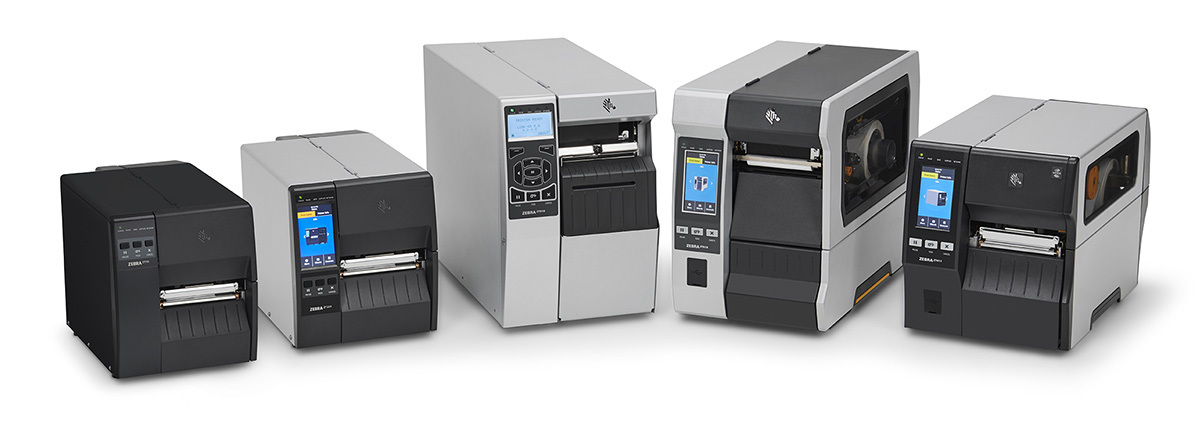
Types of Barcode Printers
Before we dive into Zebra's offerings, let's first understand the different types of barcode printers available in the market. Barcode printers can be broadly categorized into three main types:
Tabletop Printers
These compact and versatile printers are designed to fit comfortably on a desk or countertop. They are ideal for small to medium-sized businesses with moderate printing needs.
Desktop Printers
Similar to tabletop printers in terms of size, desktop printers are typically used for lower-volume printing applications.
Mobile Printers
As the name suggests, these printers are portable and designed for on-the-go printing. They are commonly used in field service, transportation, and logistics applications.
In addition to the form factor, barcode printers also differ in the technology they use to create the barcode image. The two primary printing technologies are direct thermal and thermal transfer. Direct thermal printers use chemically treated, heat-sensitive labels that blacken when they pass under the thermal printhead. These printers are simple and inexpensive to maintain as there is no ink, toner, or ribbon to replace. However, direct thermal labels are sensitive to heat, sunlight, and abrasion, making them less durable than thermal transfer labels.
Thermal transfer printers, on the other hand, use a ribbon and a printhead to produce more durable and long-lasting barcode images. In this method, the thermal printhead uses heat to transfer ink from the ribbon to the label material. This technique provides images with higher quality and durability, making them suitable for applications where the labels need to withstand harsh conditions or last for an extended period. Thermal transfer printers can also print on a wider variety of media, including paper, polyester, and other synthetic materials.
Differences Between Tabletop, Desktop, and Mobile Barcode Printers
While all three types of printers serve the purpose of generating barcodes, they differ in terms of their capabilities and intended use cases. One of the most significant differences is their convenience and portability. Mobile printers are designed to be compact and lightweight, making them easy to carry around. They are ideal for workers on the go who need to print labels or receipts in the field. Desktop printers, while also compact, are typically stationary and better suited for office environments. Tabletop printers offer a balance of portability and functionality, making them suitable for various settings.
Another key difference lies in printing quality and speed. Traditional desktop printers often produce higher-quality prints compared to mobile printers due to the use of toner or ink cartridges. They also tend to have faster print speeds, making them more efficient for high-volume printing tasks. Mobile printers, while offering acceptable print quality for most applications, may not be as sharp or as fast as desktop printers.
Connectivity is another important factor to consider. Mobile printers typically come with Wi-Fi, Bluetooth, or NFC capabilities, enabling users to print directly from their mobile devices. Desktop printers, while traditionally connected to computers via cables, also offer Wi-Fi and Bluetooth connectivity options for added flexibility.
Cost is also a significant differentiator. Desktop printers are generally more expensive than mobile printers due to their advanced features and higher print quality. However, they offer greater durability and longer lifespan, potentially leading to cost savings in the long run. Mobile printers, while less expensive upfront, may have higher running costs due to the shorter lifespan of their ink cartridges.
Finally, power source is another consideration. Mobile printers usually have a built-in battery, allowing them to operate even without a direct power source. Desktop printers, on the other hand, require a constant power supply to function.
To illustrate these differences with real-world examples: a tabletop printer might be used in a large manufacturing or distribution facility to identify inventory or products, while a mobile printer would be more suitable for delivery drivers printing receipts on the go. A desktop printer, on the other hand, might be used in a retail setting for printing receipts or smaller volume shelf tags or price labels.
Zebra Technologies Tabletop Barcode Printer Models
Zebra Technologies offers a diverse range of tabletop barcode printers to cater to various needs and applications. Some of their popular models include:
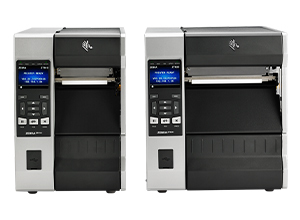
Zebra ZT610 / ZT620 Printer
The ZT600 series represents Zebra's premium line of industrial printers, ideal for high-volume printing in demanding environments. These printers are known for their rugged durability, exceptional performance, and advanced features, including high-resolution printing options (up to 600 dpi) and RFID capabilities. The ZT600 series is a top choice for applications that require top-notch print quality and advanced functionality. The Zebra ZT610 has a 4" wide printing capability while the Zebra ZT620 can print up to 6.6" wide barcode labels.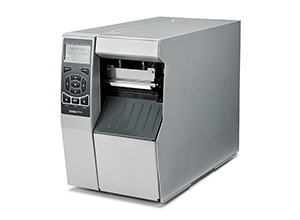
Zebra ZT510 Printer
The ZT510 is a cost-effective industrial printer that builds on the legacy of the 105SLPlus printer. It offers a durable design, advanced management capabilities, and a variety of connectivity options. This model strikes a balance between performance and affordability, making it suitable for businesses that need a reliable and durable printer without the premium price tag of the ZT600 series.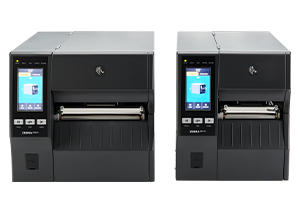
Zebra ZT411 / ZT421 Printer
The ZT400 series is designed for mid-range printing applications. These printers offer a balance of performance, features, and affordability. They are suitable for a wide range of industries and applications. Notably, the ZT411 model offers a linerless printing option, making it a more sustainable and cost-effective choice for businesses looking to reduce waste and material costs. The Zebra ZT411 offers a 4" wide printing capability while the ZT421 prints up to 6.6" wide labels.
Zebra ZT231 Printer
The ZT231 is a compact and versatile printer that is ideal for light industrial environments. It offers fast print speeds, high-resolution print quality, and a user-friendly color touchscreen. This model is a good option for businesses that need a compact and easy-to-use printer with advanced features like a color touchscreen and optional RFID capabilities.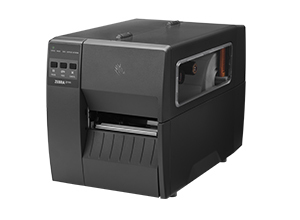
Zebra ZT111 Printer
The ZT111 is one of Zebra's most affordable light-industrial printers. It offers a compact design, essential features, and reliable performance at a budget-friendly price point. This model is a good entry point for businesses that need a basic industrial printer with reliable performance and a compact footprint.
Key Capabilities of Zebra Tabletop Barcode Printers
| Model | Key Capabilities |
|---|---|
| ZT610 | High-speed printing, high-resolution options (up to 600 dpi), RFID capabilities, durable construction, advanced connectivity options |
| ZT620 | Wider print width (6.6 inches), high-speed printing, durable construction, advanced connectivity options |
| ZT510 | Durable construction, high-speed printing, advanced management capabilities, variety of connectivity options |
| ZT411 | Linerless printing option, high-speed printing, RFID capabilities, durable construction, advanced connectivity options |
| ZT421 | Wider print width (6.6 inches), high-speed printing, durable construction, advanced connectivity options |
| ZT231 | Compact design, fast print speeds, high-resolution options (up to 300 dpi), color touchscreen, optional RFID and wireless connectivity |
| ZT111 | Compact design, essential features, reliable performance, affordable price point |
Common Use Cases for Zebra Tabletop Barcode Printers
Zebra tabletop barcode printers are used across a wide range of industries and applications. Here are some common use cases for each model:
| Model | Common Use Cases |
|---|---|
| ZT600 Series | Work-in-process labels, product ID labels, package labeling, receiving/put-away labels, compliance labeling, RFID case/pallet labels |
| ZT510 | Product identification labeling, packaging labeling, receiving/put-away labeling, work-in-process labels, asset tracking, compliance labeling |
| ZT400 Series | Back-of-store operations, laboratory management, inventory labels, work-in-process labels, shipping labels, asset labels, compliance labeling, RFID case/pallet labels |
| ZT231 | Work-in-process labels, product ID labels, packaging labeling, receiving/put-away labels, compliance labeling, laboratory labeling, blood bank labeling, asset tracking |
| ZT111 | Work-in-process labels, product ID labels, packaging labeling, receiving/put-away labels, compliance labeling, laboratory labeling, blood bank labeling, asset tracking |
Zebra Technologies: Standing Out from the Competition
Zebra Technologies has earned a reputation for excellence in the barcode printing industry. Several factors contribute to their strong standing in the market:
Durability
Zebra printers are built to last, with rugged designs that can withstand harsh industrial environments. For instance, Zebra's ZT600 series printers are constructed with durable steel structural components that can withstand years of abuse in extreme temperatures, dust, debris, and other challenging industrial conditions. In contrast, some competitors, like TSC, while offering robust build quality, may not match Zebra's level of durability in extreme conditions.
Performance
Zebra printers offer high-speed printing, exceptional print quality, and reliable performance. Zebra's industrial printers can print at speeds of up to 14 inches per second, enabling faster label production and increased efficiency. They also offer high-resolution printing with up to 600 dpi, ensuring crisp, clear barcodes and text. This is a significant advantage compared to some competitors, such as Sato, whose printers may not offer the same level of print speed and resolution, particularly in their industrial models.
Advanced Features
Zebra printers come with advanced features such as RFID capabilities, linerless printing options, and user-friendly interfaces. Zebra offers a wide range of models with RFID capabilities, allowing businesses to implement advanced tracking and inventory management solutions. They also offer linerless printing options, which reduce waste and material costs while promoting sustainability. These features are not always available in printers from other brands.
Software Support
Zebra offers robust software solutions for label design, printer management, and device monitoring. Their Print DNA suite of applications provides a comprehensive platform for managing and optimizing printer performance. This includes tools for remote management, enhanced security, and ongoing updates, giving Zebra an edge over competitors who may not offer the same level of software support.
Zebra Print DNA Software
Zebra's Print DNA software is a suite of applications that enhances the functionality and manageability of their printers. It offers a range of tools and utilities that simplify printer setup, enhance security, and provide ongoing support. Some of the key benefits of Print DNA include:
Remote Management
Print DNA allows administrators to manage printers remotely, reducing the need for on-site support and minimizing downtime.
Enhanced Security
Print DNA includes security features that protect printers from unauthorized access and data breaches.
Ongoing Updates
Print DNA ensures that printers are always up-to-date with the latest firmware and security patches.
The Importance of Post-Sale Printer Support
Investing in a high-quality barcode printer is just the first step. Post-sale support plays a crucial role in ensuring the long-term success and efficiency of your printing operations. Here's why post-sale support is essential:
Maximizing Printer Lifespan
Regular maintenance and timely repairs can significantly extend the life of your printer.
Minimizing Downtime
Prompt technical support and troubleshooting assistance can help minimize downtime and keep your operations running smoothly.
Optimizing Performance
Post-sale support can help you optimize your printer's performance and ensure it continues to meet your evolving needs.
Building Strong Relationships
Excellent post-sale support fosters strong relationships with customers and builds trust in the brand.
Major Considerations When Shopping for a Heavy-Duty Tabletop Barcode Printer
When choosing a heavy-duty tabletop barcode printer, several factors warrant careful consideration:
Print Volume
Determine your daily or peak printing needs to ensure the printer can handle your workload.
Print Technology
Choose between direct thermal and thermal transfer printing based on the durability and longevity requirements of your labels.
Label Size and Print Width
Consider the maximum label width and size you need to print.
Print Resolution (DPI)
Select the appropriate DPI based on the size and complexity of your barcodes and labels. A higher DPI means sharper images, crucial for small labels. For example, the jewelry industry often uses 600 dpi printers to ensure barcode clarity on small tags.
Connectivity
Evaluate the connectivity options (USB, Ethernet, Wireless LAN, Bluetooth) based on your integration needs. For instance, Ethernet ensures seamless network integration, while Bluetooth allows mobile printing.
Additional Features
Consider specialized features such as RFID encoding, label cutters, rewinders, or peelers.
Environment
Assess environmental factors like temperature, humidity, and exposure to dust or chemicals. Industrial settings require rugged printers with environmental protection features.
Zebra Technologies offers a comprehensive range of tabletop barcode printers designed to meet the diverse needs of businesses across various industries. From the high-performance ZT600 series to the budget-friendly ZT111, Zebra has a printer for every application and budget. When choosing a Zebra printer, it's crucial to consider factors like print volume, technology, label size, print resolution, connectivity, and the environment where the printer will be used.
Zebra printers stand out from the competition due to their durability, performance, advanced features, and comprehensive software support. Their Print DNA suite of applications simplifies printer management, enhances security, and provides ongoing updates. Moreover, Zebra's global presence and excellent customer support ensure that businesses receive the assistance they need, regardless of their location.
Investing in a Zebra tabletop barcode printer is an investment in efficiency, accuracy, and long-term productivity. By choosing the right Zebra printer and taking advantage of their post-sale support offerings, businesses can streamline their operations and achieve their business goals.