
How to Clean your Zebra Printhead and Platen Roller
Posted by Advanced Automation on Feb 23rd 2017
Your Zebra thermal label printer is a workhorse, churning out labels for shipping, inventory, and product identification. But to keep it running reliably and efficiently, there's one simple maintenance task that's absolutely non-negotiable: regularly cleaning the Zebra printhead and platen roller. Neglecting this crucial step leads to a host of preventable problems, including poor print quality, wasted supplies, and the premature death of your expensive printhead.
The good news? The solution is incredibly simple and takes only a moment.
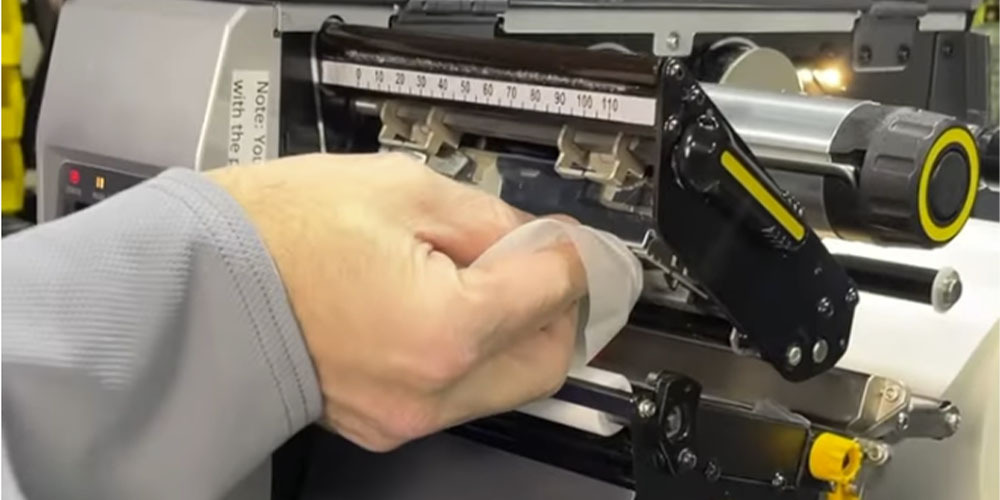
The High Cost of a Dirty Zebra Printead
Dirt, dust, adhesive from labels, and residue from thermal ribbons constantly build up on the internal components of your printer. While it might seem minor, this accumulation directly causes significant operational issues.
Degraded Print Quality & Failed Barcode Scans
The most immediate symptom of a dirty printhead is a sharp decline in print quality. You'll start to see white lines, voids, or streaks running through your text and barcodes. This debris acts as an insulator, preventing the delicate heating elements on the printhead from making proper contact with the label or ribbon.
The result? Faded, incomplete barcodes that your scanners can't read. A failed scan can bring a shipping line to a halt, cause inventory errors, and create major logistical headaches. Ensuring optimal barcode scanning begins with a clean printhead that can produce crisp, fully-formed barcodes every time.
A Shorter Printhead Lifespan
A Zebra printhead is a consumable part, but it's also one of the most expensive components to replace. A dirty printhead will wear out dramatically faster. When debris insulates the heating elements, the printer often compensates by increasing the heat setting (darkness level) to try and "burn through" the grime.
This extra heat puts immense strain on the printhead elements, causing them to fail prematurely. What could have been a component with a long, useful life becomes a frequent and costly replacement. If you want to maximize your printhead life, cleaning is the single most effective action you can take.
Blank Labels, Skipping, and Jams
The printhead isn't the only critical part. The platen roller—the black rubber roller that provides the backing pressure for the printhead—is just as important. Over time, it becomes coated with label adhesive, dust, and grime.
When the platen roller is dirty, it loses its grip. This can cause the label stock to slip and slide as it feeds through the printer, leading to a variety of issues:
- Label Skipping: The printer feeds one or more blank labels between printed ones.
- Drifting Print: The image is not centered correctly on the label.
- Material Jams: The slipping media can bunch up and cause a frustrating jam.
Each of these problems means wasted time, wasted labels, and increased operator frustration. When you clean your platen roller, you ensure a smooth, consistent media path, which is essential for reliable printing.
The Simple Solution: Isopropyl Alcohol Wipes
Fortunately, preventing these issues is remarkably easy and inexpensive. The best and most recommended method is to use specialized cleaning wipes pre-saturated with isopropyl alcohol (IPA).
Why Isopropyl Alcohol? IPA is the perfect cleaning agent for this task. It effectively dissolves adhesive, ink residue, and oils without being abrasive or damaging the sensitive printhead elements. Crucially, it evaporates completely, leaving behind no residue that could interfere with printing. NEVER use water, rough cloths, or sharp objects to clean the printhead, as this will cause permanent damage.
The Zebra Printhead Cleaning Routine: Simple & Fast
Make this a non-negotiable part of your workflow. The best practice is to clean the printhead every one or two times you change a roll of labels. While you're at it, give the platen roller a quick wipe-down as well.
- Power Down: Always turn the printer off and open the printhead assembly.
- Wipe the Printhead: Gently wipe the thin grey line of the printhead from one side to the other. Use a fresh part of the wipe for each pass if it's very dirty.
- Clean the Platen Roller: While the assembly is open, vigorously wipe the entire surface of the black rubber platen roller, rotating it as you go to clean the full circumference.
- Allow to Dry: Wait a minute for the alcohol to completely evaporate before closing the unit and turning the power back on.
That's it. This simple, 60-second routine is your best defense against poor performance and premature component failure, saving you significant money and frustration in the long run.
Watch Our Video Tutorial:
Hit subscribe for ongoing maintenance guides and pro tips for your Zebra barcode printer.